SQUARE CASHIER TUTORIALS FOR GINZA
Thank you for being a Ginza cashier. For many guests, you may be the first Ginza staff they encounter: be courteous, helpful and accurate! The sections on this page are setup to help you to fully prepare.
Notes for 2026:
- At least 20 minutes before your booth opens for the day, cashiers should pick up their cashbox and square terminal at the office (and return them when your booth closes at the end of day).
- Never leave the square terminal or cashbox unattended in your booth.
- Always double-check the amount you are about to charge and tell the customer before processing their credit card.
- The Refreshments Booth will now use the white Square terminals – iPads have been eliminated.
- All cashiers, except Gates & Raffle, are required to record cash and credit card transactions on Square.
- Chicken Cashiers must print receipts – for all other cashiers, including Corn/Udon, printed receipts are optional.
- You will be asked to fill out a short form to let us know you completed training.
Quick Links to Sections:
1. BOOTH SPECIFIC GUIDELINES
Only Focus on Your Booth

- RECORD ALL CASH AND CREDIT ON SQUARE (credit cards, debit cards, Apple Pay and Google Pay are accepted).
- DOUBLE-CHECK and TELL the Customer the AMOUNT Before Processing a Card
- DO NOT ACCEPT CHECKS
- MUST PRINT RECEIPTS (customers gives receipts to Chicken/Veggie Food team)
- NO SPLIT PICKUPS: INFORM CUSTOMERS THEY MUST PICKUP UP ALL ITEMS ON THE RECEIPT AT THE SAME TIME.
- If a customer wants to “pickup some now and some later” that can be done with TWO SEPARATE TRANSACTIONS each with its own receipt. Warning: The customer bears the risk of us selling out before they return to pickup.
- BASIC FUNCTIONS
- ADVANCED FUNCTIONS
- CHANGE RECEIPT PAPER

(Plus RAFFLE SALES)
- GATES DO NOT HAVE TO RECORD CASH ON SQUARE
- DOUBLE-CHECK and TELL the Customer the AMOUNT Before Processing a Card
- The SOUTH GATE cashiers will assist the RAFFLE BOOTH for credit card transactions – FIND THE RAFFLE SALES ITEM IN THE “GATES” CATEGORY
- For CREDIT CARD sales, TAP the NORTH Gate or SOUTH Gate item (or RAFFLE) on SQUARE (credit cards, debit cards, Apple Pay and Google Pay are accepted).
- NO CHECKS ACCEPTED
- PRINT RECEIPTS ONLY IF REQUESTED BY CUSTOMER
- BASIC FUNCTIONS
- ADVANCED FUNCTIONS
- CHANGE RECEIPT PAPER

- Refreshment booth cashiers will use the small white Square terminals.
- RECORD ALL CASH AND CREDIT ON SQUARE (credit cards, debit cards, Apple Pay and Google Pay are accepted).
- DOUBLE-CHECK and TELL the Customer the AMOUNT Before Processing a Card
- NO CHECKS ACCEPTED
- PRINT RECEIPTS ONLY IF REQUESTED BY CUSTOMER
- BASIC FUNCTIONS
- ADVANCED FUNCTIONS
- CHANGE RECEIPT PAPER

- RECORD ALL CASH AND CREDIT ON SQUARE (credit cards, debit cards, Apple Pay and Google Pay are accepted).
- DOUBLE-CHECK and TELL the Customer the AMOUNT Before Processing a Card
- NO CHECKS ACCEPTED
- CALL OUT ORDER TO FOOD TEAM
- PRINT RECEIPTS ONLY IF REQUESTED BY CUSTOMER
- BASIC FUNCTIONS
- ADVANCED FUNCTIONS
- CHANGE RECEIPT PAPER

- RECORD CASH AND CREDIT* ON SQUARE – see BASIC FUNCTIONS video to lean how to do this. *Credit cards, debit cards, Apple Pay and Google Pay are accepted.
- NO CHECKS ACCEPTED
- RECEIPTS PRINTED ONLY IF REQUESTED BY CUSTOMER
- This booth MAY have an iPad Square terminal – so it is recommended that you watch the iPAD video
- BASIC FUNCTIONS
- ADVANCED FUNCTIONS
- CHANGE RECEIPT PAPER

- FOLLOW BOOTH PROCEDURE FOR VALIDATING AGE OF CUSTOMER.
- RECORD ALL CASH AND CREDIT ON SQUARE (credit cards, debit cards, Apple Pay and Google Pay are accepted).
- DOUBLE-CHECK and TELL the Customer the AMOUNT Before Processing a Card
- NO CHECKS ACCEPTED
- PRINT RECEIPTS ONLY IF REQUESTED BY CUSTOMER
- BASIC FUNCTIONS
- ADVANCED FUNCTIONS
- CHANGE RECEIPT PAPER

- RECORD ALL CASH AND CREDIT ON SQUARE (credit cards, debit cards, Apple Pay and Google Pay are accepted).
- DOUBLE-CHECK and TELL the Customer the AMOUNT Before Processing a Card
- WAZA CAN ACCEPT CHECKS AND RECORD THEM ON SQUARE
- PRINT RECEIPTS ONLY IF REQUESTED BY CUSTOMER
- BASIC FUNCTIONS
- ADVANCED FUNCTIONS
- CHANGE RECEIPT PAPER
- WAZA CASHIERS

- RECORD ALL CASH AND CREDIT ON SQUARE (credit cards, debit cards, Apple Pay and Google Pay are accepted).
- DOUBLE-CHECK and TELL the Customer the AMOUNT Before Processing a Card
- NO CHECKS ACCEPTED
- PRINT RECEIPTS ONLY IF REQUESTED BY CUSTOMER
- BASIC FUNCTIONS
- ADVANCED FUNCTIONS
- CHANGE RECEIPT PAPER
2. SQUARE VIDEO TUTORIALS
Everyone Should Watch the Videos
The first three videos (Square Basic Functions, Square Advanced Functions, and Change the Receipt Roll) should be viewed by ALL cashiers no matter what booth you are working in. Other notes:
- There is a Waza specific video for cashiers volunteering in the WAZA booth.
- Be aware: These videos were created in 2024 and you may notice differences like prices or WAZA participants or even some screen colors. DON’T BE CONCERNED, the live Square Application will reflect the current 2026 information.
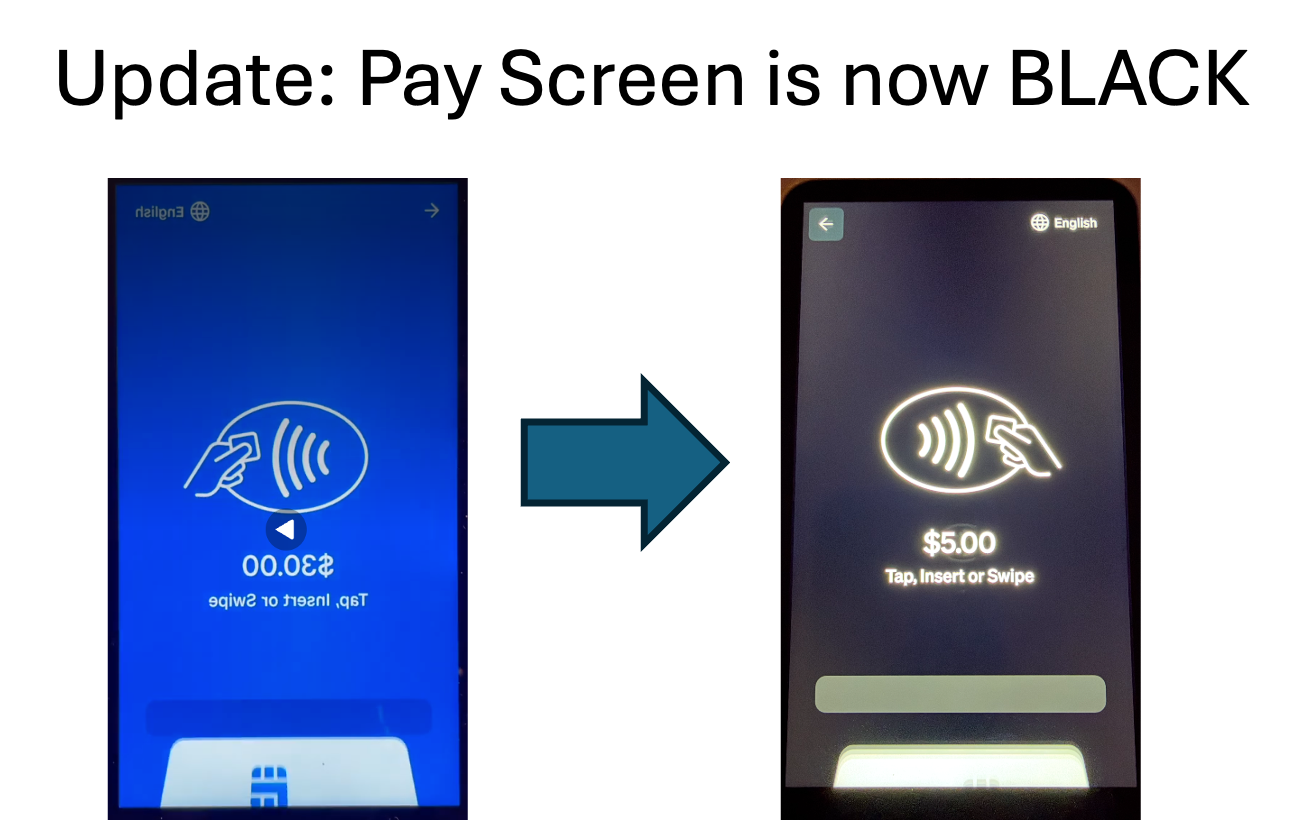
- In the latest Square software update the color of the Pay Screen and other links have changed form blue (as seen in the videos) to black or grey.
BASIC SQUARE FUNCTIONS
navigation, orders, payments, receipts
EVERYONE SHOULD WATCH THIS VIDEO
- 0:00 Intro and navigation on the app
- 1:47 Create and modify an order
- 4:57 Take a Credit Card (or smartphone) payment
- 7:17 Print Receipts
- 9:45 Take a Cash Payment
NOTES ABOUT THIS VIDEO:
- Corn and Udon receipts are NOT mandatory – only print on request of the customer
- GATE Cashiers do NOT record cash transactions on Square
ADVANCED SQUARE FUNCTIONS
cancel order, refunds, change payments, reprints
EVERYONE SHOULD WATCH THIS VIDEO
- 0:00 Intro
- 0:47 Cancel an Order Before Payment
- 1:29 Exit the Blue Payment Screen
- 3:15 Refunds and Reprint Receipts
CHANGE RECEIPT PAPER
For the White Square Terminal
FOR CASHIERS USING THE WHITE SQUARE TERMINAL
iPAD SQUARE TERMINAL
Full Screen iPad
iPads May Be used in the Snacks and ShopMBT Booths
This video was originally made for the Refreshments booth but the functions will work for any booth.
WAZA CASHIERS
General Information for WAZA BOOTH
FOR CASHIERS IN THE WAZA BOOTH
- 0:00 Intro
- 0:50 Credit card transaction
- 4:54 Cash Transaction
- 7:08 Check Transaction
It is strongly recommended that you also view the Basic Functions and Advanced Functions videos.
Don’t worry if you see different than current WAZA participants in this video. The live Square Terminal will be updated with the current WAZA artisans.
3. RULES & POLICIES ALL CASHIERS
Everyone Should Read This Section
GENERAL OPERATING NOTES
- Know how to use our Square system: The guidelines and videos here give you all the information you need to be a Ginza cashier. Even if you’re experienced with our Square system please refresh your memory. During your shift, if you don’t know how to do something check with one of our Square admins – Jerry, Alexa, Dana, or Jason. Just like the cashbox, never leave the Square terminal unattended or allow a customer to handle it.
- Methods of Payment: Square terminals can accept Credit Cards, Debit Cards*, Apple Pay, and Google Pay – learn how in the videos below. *Debit Cards are processed just like a Credit Cards – no security pin required.
- Paper Receipts: Printing receipts is only required at the chicken sales booth. For all other booths printed receipts are optional (by customer request).
- Recording Transactions: With the exception of North/South Gates*, cashiers will record all transactions (credit and cash) on their Square terminal. *North/South Gate cashiers use the Square terminal ONLY for credit transactions and can just place cash in the cashbox to be counted by the Treasurer.
- Equipment Issues: Each location using a White Square Terminal will have extra receipt tapes on hand. If you have any other issues with your device contact Jerry, Dana, or Jason.
- Treasurer: One of the Ginza treasurers will check in with each booth regarding the cashbox (need change or to offload cash).
- Drinks & Food: No alcohol while working a shift – please stay hydrated with water or other non-alcoholic beverages. If you work in a Food Concession booth, sanitation rules prohibit eating where food is being handled. If you work in a booth that does not serve food or drink, you may eat snacks that are easy to eat, like chips or popcorn. Please reserve eating full meals for breaks.
SHIFT CHANGE NOTES
- Beginning of Day: At least 15 minutes before your booth opens, each cashier should go to the office to pick up the Square Terminal and Cash Box. Terminals will be charged, powered on, and logged on (cashiers don’t need to power or sign on).
- Shift Changes: Hand off the terminal to your replacement – make sure that someone in the booth is physically responsible for the terminal and cashbox.
- End of Day: When you close your booth we ask that you bring the Cashbox AND terminal to the office. Exception – any booth using the iPad Square Terminal, the Ginza admin team will collect the iPad Terminal BUT bring your Cash box to the office.
4. Q & A
Everyone Should Read This Section
ARE SIGNATURES REQUIRED WHEN A CREDIT CARD IS PROCESSED? NO, Banks no long require signatures for credit card transactions. Cashiers simply process the card (tap or insert) and Square will complete the transaction without a signature.
CAN WE ACCEPT DEBIT CARDS? Yes, Debit Cards are processed exactly the same as Credit Cards (tap or insert). The customer DOES NOT have to provide their pin. Square will automatically charge their bank as soon as the card is processed.
WHERE CAN I GET REPLACEMENT RECEIPT PAPER? Each cashier location will have spare receipt rolls provided to them. If you run out or are running low, contact either Jerry, Jason, Dana, or Kristin. Refer to the video tutorial to see how to change the receipt paper.
CAN A CUSTOMER “SPLIT” A PAYMENT BETWEEN 2 CREDIT CARDS? The short answer is NO. You can tell the customer “Sorry, but we cannot split a payment”. Note: even though Square does support this function, we are not using it for Ginza.
REFUNDS: CAN I REFUND A SINGLE ITEM VS THE WHOLE ORDER? Yes, in the case you accidentally charge for more items than the customer requested. Follow the Refund directions in the Advanced Functions video; on the Refund screen you will see option to Refund a single item. Only use this option in the case where we overcharged a customer. If this is done at Chicken Sales – you must reprint the receipt.
REFUNDS: IS THERE A FASTER WAY TO LOCATE A TRANSACTION FOR REFUND PROCESSING? Yes, once you are looking at the list of transactions you can use the Search function and the customer’s credit card to quickly locate the right transaction. Follow the Refund directions in the Advanced Functions video but instead of scrolling down to look for the right transaction you can use the Search function. 1) On the Transactions screen tap the Search bar, 2) at this point you can have the customer tap their credit card (the one they used for the purchase) and the system will look for that number, 3) the transactions purchased with that card will popup and you can continue with the refund.
GATE CASHIERS: I DO NOT HAVE TO RECORD CASH TRANSACTIONS ON SQUARE – IS THAT RIGHT? Yes, that is right (for Gates only!) We suggest that you engage the customer and ask how many persons will enter. When they tell you how many, ask “will that be cash or credit card” – if they answer CASH, you don’t need to touch the Square terminal, simply take the money and make change out of the CashBox.
CHICKEN CASHIERS: WHAT IF A CUSTOMER WANT TO KEEP THEIR RECEIPT. Customers can keep their receipts after they pickup their dinners. Chicken cashiers ALWAYS prints a receipt and gives it the customer to present at the Chicken Pickup table. The Chicken Pickup team will mark the receipt with a marker and return the receipt to the customer.
CHICKEN CASHIERS: WHAT IF A CUSTOMER WANTS TO BUY FIVE DINNERS TO EAT ONE NOW AND PICKUP THE REST LATER? We cannot redeem “part” of a receipt, the customer must pickup all the items on the receipt. We are trying to move away from the practice of paying now and picking up later. A placard will be placed by the Chicken cashiers indicating “We ask that guests pickup the entire order at time of purchase“. If a customer chooses to place two separate orders they can theoretically pick up one order now and another one later – but if we sell-out, their food may not be available when they choose to come back.
If you have a question, feel free to send it to me jerry.matsumoto@mbtchicago.org
5. SQUARE EQUIPMENT FOR GINZA
White SQUARE Terminal
Used at ALL booths except Refreshments booth

iPAD with SQUARE Terminal
Used in Refreshments Booth Only